Guides
How to remove a language from your project
How to remove a language from your project
If you no longer need a language in your project, removing it is quick and simple.
Open the Settings Popup
Click the gear icon in the top-right corner of the FramerLoc panel to open the Settings popup.
Locate the "Remove a Language" Section
In the Settings popup, find the Remove a language section. It displays a list of all the languages currently added to your project. Next to each removable language, you will see a small × button.
Double-Click to Delete
To delete a language, simply double-click the × button next to its name. The language will be instantly removed from your project.
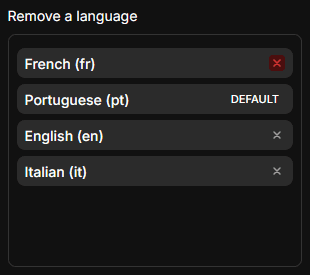
Note: You cannot remove the default language. If you need to delete the language currently set as default, you must first assign a different language as the default.