Guides
How to Configure Your Project's Primary Language
How to Configure Your Project's Primary Language
The default language is one of the most important settings in FrameLoc. It defines the base language of your Framer site — the language in which your content is originally written — and it is what FramerLoc uses as a reference for all translations.
Open the Settings Popup
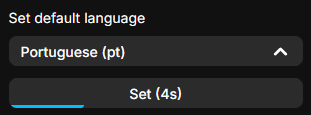
Click the gear icon in the top-right corner of the FrameLoc panel to open the Settings popup. Scroll down to the Set default language section. There you will find a dropdown listing all the languages you have added to your project.
Choose Your Default Language and Confirm
Select the language that matches your site's original content from the dropdown, then press and hold the Set button for 5 seconds to confirm. A progress indicator appears on the button as you hold it, and the language becomes your default once the timer completes.
A Word of Advice
It is strongly recommended to set your default language once — ideally during the initial setup — and never change it afterwards. Your default language must match the language in which your Framer site is written. If your site content is in French, your default language in FrameLoc must be French. While technically possible to change later, keeping it consistent from the start ensures your translations remain reliable and your project stays properly structured.